NotaeLibrary
🛒 Importing Books from Amazon
Paste an Amazon product link and the platform builds a catalog record, an Amazon metadata record, and a bookshelf entry for the room. This guide covers the lookup, the manual-entry fallback, duplicates, and what the room actually gets.
🛒 Amazon📚 Catalog work🧠 Indexed🛡️ Owner / Moderator
On this page
🛒
What Import from Amazon is
Import from Amazonturns an Amazon product link into a room shelf entry. You paste the product URL, the platform extracts the ASIN, looks up the book's metadata, and lets you add it.
Importing creates — or reuses — three things: a platform catalog work, an Amazon (KDP) record, and a bookshelf entry in this room. The book then behaves like any other catalog work on the shelf.
🔗 One URL
A product page link is enough; the ASIN is read from it.
🏷️ Metadata preview
Cover, title, author, pages, and description are shown before you add.
📚 Reused when known
If the book already exists on the platform, the import reuses that record instead of creating a second one.
🧠 Indexed for the room
The title and description are embedded for the room's assistant.
ℹ️The book is a catalog record, not a reading copy.The import adds the work and its metadata to the shelf; access to the text still depends on the platform's catalog.
🧭
Amazon, My Library, or a link?
| Source | Use it for |
|---|---|
| 🛒 Import from Amazon | A book that is not yet on the platform, identified by its Amazon product link. |
| 📚 From My Library | A catalog work already on the platform that you have saved. |
| 🔗 Web Link / Article | An Amazon page or any other URL as a plain link, without creating a catalog work. |
💡Already on the platform? Use My Library. The Amazon import is for bringing a new book in; the shelf import reuses an existing catalog record when it finds one.
👑
Who can import
Only the room owner and moderators can import Amazon books. The card is hidden from contributors and members, and the page redirects them away.
👑 Owner
Can import, and their imports are approved immediately.
🛡️ Moderator
Same access; imports are approved immediately.
✍️ Contributor / 👤 Member
Cannot import. They can read and discuss the resulting work.
ℹ️No credits are charged for an Amazon import. It is a metadata import, not an AI run.
🧰
Before you start
🔗 The Amazon product URL
A product page link — /dp/…, /gp/product/…, or a short link. The ASIN must be readable from it.
📖 The right edition
Amazon has many editions of the same book. Check the ASIN and the cover match what the room wants.
✍️ Manual details, if needed
Indie and Kindle-only books may not be in the metadata source; be ready to type the title, author, and description.
🖼️ A cover, if the lookup misses
A missing cover can be supplied as an image URL before adding.
🧭
Where to find it
On the room's Add to Bookshelf page, the Files & media section holds the 🛒 Import from Amazon card. It opens the dedicated page.
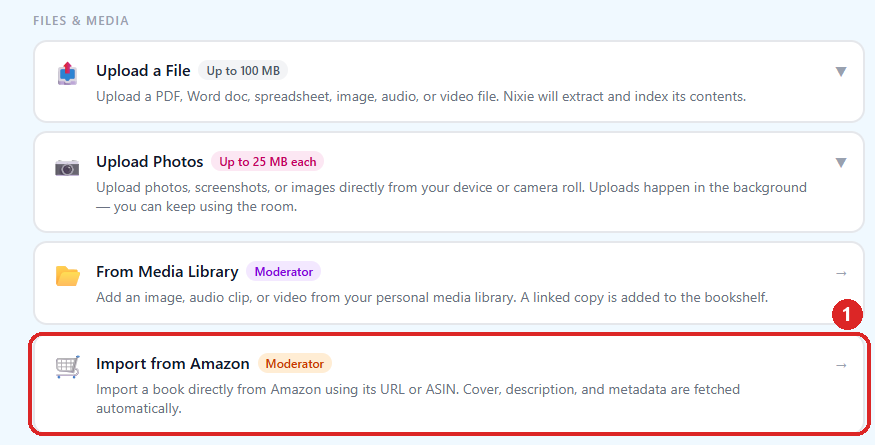
The page lives at /study-rooms/<room>/bookshelf/add/amazon.
🖼️
The import page
The page starts with one field. Paste the product URL and press Look Up (or Enter) to fetch the book.
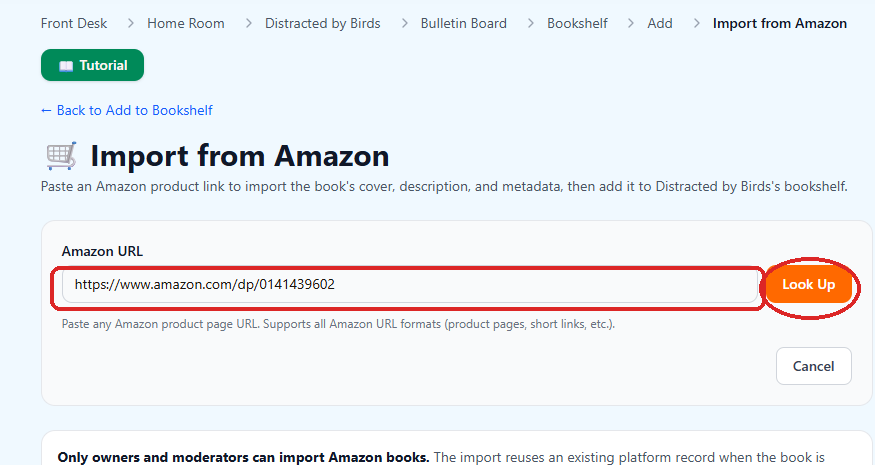
🔗 Amazon URL
Any product-page format with an ASIN. A missing ASIN is rejected before any lookup.
🔎 Look Up
Fetches the book's metadata and shows the preview.
📚 Preview
Cover, title, author, pages, description, and whether it is already on the platform.
✍️ Manual entry
Shown when the book is not found; title is required, the rest is optional.
➕
Step by step
1
Open the room's Add to Bookshelf page
Bookshelf → Add Knowledge to Bookshelf.
2
Open Import from Amazon
In Files & media, click 🛒 Import from Amazon.
3
Paste the product URL
Copy the Amazon product page address. Short links and different Amazon domains are accepted as long as the ASIN is present.
4
Look Up
Press Look Up. The page fetches the metadata and shows the preview card.
5
Check the edition
Confirm the title, author, and cover. An Already on platform badge means the import will reuse that record.
6
Fill in missing details if asked
If the lookup says the book was not found, enter the title (required), author, description, and optionally a cover image URL.
7
Add to Bookshelf
Click Add to Bookshelf. A toast confirms and the page returns you to the room's bookshelf.
💡Already on this room's shelf? The import does not create a duplicate; it says so and leaves the form open. Use ← Search again for another book.
✨
How the lookup behaves
The lookup resolves the ASIN to a book, usually through a Google Books ISBN match. Amazon's CDN cover is used as a fallback when no cover comes back.
✅ Found
The preview shows the metadata; check the edition and add.
🆕 New to the platform
The import will create the catalog work and Amazon record.
🔁 Already on the platform
The existing work is reused and linked to this room.
✍️ Not found
Manual entry is requested; the import can still be completed.
⚠️Lookup is best-effort. Indie and Kindle-only titles, regional editions, and older printings are the usual misses. Manual entry exists for exactly those cases.
🗄️
What gets saved
The import writes a platform catalog work and an Amazon KDP record (or reuses them), then creates the room's shelf entry linked to that work.
📚 Catalog work
Title, author, description, cover, ASIN, and page count — a first-class work on the platform.
🛒 Amazon record
The ASIN link that identifies the Amazon edition.
📎 Shelf entry
Approved immediately for owners and moderators, with high confidence.
🧠 Indexed text
The title and description are embedded for the room's assistant and the catalog index.
ℹ️The shelf entry is room-scoped.The catalog work can be shared by other rooms, but this room's shelf entry is its own.
🔁
After importing
1
Find it under Works
The book appears on the room's bookshelf as a work, with its cover and title.
2
Read or discuss
Open the work to read (where the catalog provides it) and start its discussion.
3
Ask the assistant
The work's title and description are indexed, so the room's AI can identify the book and point to it.
4
Fix the metadata if needed
Owners and moderators can edit the shelf card and, where permitted, the work's catalog metadata.
🔐
Who can do what
| Action | Member | Contributor | Moderator / Owner |
|---|---|---|---|
| Read an imported work | ✅ | ✅ | ✅ |
| Open Import from Amazon | — | — | ✅ |
| Look up a book | — | — | ✅ |
| Import the book | — | — | ✅ |
| Read the imported metadata | ✅ | ✅ | ✅ |
✅ always · — never. Amazon imports are steward-only; owners and moderators bypass the room's approval queue.
💡
Best practices
💡Use the product page, not a search URL. The importer needs an ASIN; a search-results link cannot be looked up.
💡Check the edition before adding. The same title can have several ASINs; confirm the cover, publisher, and page count match what the room wants.
💡Fill manual details for indie titles. A typed title, author, and description are better than a bare ASIN that the lookup could not identify.
💡Use My Library for platform books. Import is for new books; a work already on the platform can be shelved from your library.
⚠️Don't import the same book twice. The import reuses the platform record and refuses a duplicate on the same shelf, but check the edition first so you do not end up with two different editions by accident.
❓
FAQ
▶Why does Look Up say no ASIN was found?
The URL is not an Amazon product page. Copy the product page address (it contains /dp/ or /gp/product/), not an Amazon search results page.
▶Look Up failed or the book is not found.
The metadata source may not know the book — common for indie and Kindle-only titles. Fill in the manual title (required), author, description, and cover, then add it.
▶The preview says Already on platform. What happens?
The import reuses the existing catalog work instead of creating a second one, and adds a shelf entry for this room.
▶It says the book is already on my shelf.
This room already has that work. No duplicate is created; search for a different book.
▶Can I add the book without a cover?
Yes. The preview shows a placeholder if no cover is available; you can paste a cover image URL in the manual-entry panel.
▶Does importing cost credits?
No. The Amazon import is a metadata operation, not an AI research run.
▶Can a contributor import a book?
No. Only room owners and moderators can import, and their imports are approved immediately.
▶Does the room get the full book text?
The import creates the catalog record and shelf entry. Whether the full text is readable depends on the platform's catalog and the work itself.
🚀
Try it on a real shelf
Open the example room's Amazon import page, or continue with the other work sources.
🛒→📚→📚→🔗→🎓→
Open Import from Amazon
Look up a book and add it to Distracted by Birds.
Bookshelf Knowledge
How works, links, documents, and media become one room knowledge base.
Adding From My Library
Shelve a catalog work you have already saved.
Adding Web Links & Articles
Save the Amazon page as a plain link instead of a work.
All tutorials
Browse the full tutorial library for more guides.
Add a book the platform does not have yet
Paste the product link, check the edition, and shelve it.