NotaeLibrary
🔗 Adding Web Links & Articles
A Web Link / Article is a saved URL on the room's bookshelf. This guide covers the dedicated page, the automatic metadata fetch, the full-page option that makes an article searchable, and what the room gets after you add it.
🔗 Links📰 Articles🧠 Indexed🛡️ Permissioned
On this page
🔗
What a Web Link / Article is
A Web Link / Articleis a URL saved to the room's bookshelf: a news story, a research paper, a Wikipedia entry, a blog post, a documentation page — anything on the web the room should read and discuss.
The shelf stores the link, not a copy of the web page. It keeps the URL, a title, a description, optional notes, the source type, and — when you ask for it — a text copy of the page for search. The link appears under 📎 Files & Links on the bookshelf, with its own discussion.
📎 A saved URL
The canonical address, plus the metadata that makes it findable.
🏷️ Your framing
Title, description, and notes are what the room sees first — and what the assistant can retrieve.
📄 Optional page text
Turn on full-page import to store the article's text, not just its address.
💬 Its own discussion
A link can have a dedicated channel, just like a work or document.
ℹ️A YouTube URL is still welcome here. The form detects it, shows an embed preview, and files it under Videos — but for playlists, use the dedicated Videos page instead.
🧭
Link, library work, or document?
All three end up on the shelf, but they are for different material.
| Source | Use it for |
|---|---|
| 🔗 Web Link / Article | Anything on the open web — an article, paper, reference page, or video. |
| 📚 From My Library | A catalog work you saved and collected on this platform. |
| 📄 New Document | Original or curated content the room will edit together. |
| 📜 Write a Notae | A short original note, summary, or finding. |
💡The link is not the knowledge. Saving a URL gives the room a pointer. Turning on full-page import, or writing a Notae about it, gives the room something it can actually answer from.
🔐
Who can add a link
Adding a link follows the room's bookshelf permission level, the same setting that governs works and documents.
👑 Owner / 🛡️ Moderator
Always can add. Their additions are approved immediately.
✍️ Contributor
Can add when the room allows moderators and contributors, or all members.
👤 Member
Can add only when the bookshelf is open to all members.
⚠️Owner-only shelves stay owner-only. In that mode no other role reaches this page; the room redirects back to the bookshelf.
🧰
Before you start
🌐 A reachable page
The link should load for a normal visitor. Pages behind a login, a paywall, or heavy JavaScript may not give auto-fill or full-page import anything to work with.
🏷️ A title in mind
Title is required. Auto-fill usually supplies it, but a clear one of your own is better for the shelf.
📝 A reason
The notes field is your chance to say why the room should read it — and it is indexed.
🔎 A decision on full-page import
Do you need the room's assistant to answer from the article body, or is the link enough?
🧭
Where to find it
On the room's Add to Bookshelf page, the From the web section holds the 🔗 Web Link / Article card. It opens the dedicated page.
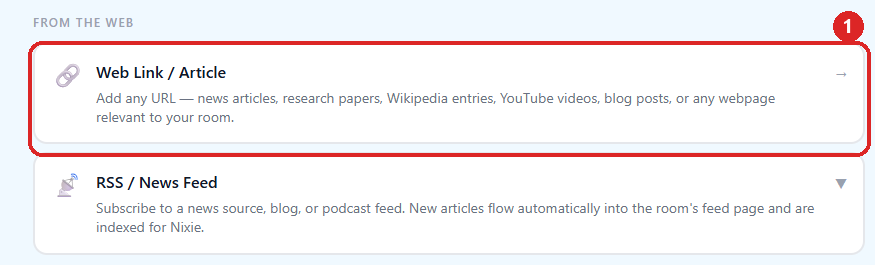
The page lives at /study-rooms/<room>/bookshelf/add/weblink. The RSS / News Feed card beneath it still expands in place.
🖼️
The Web Link page
The page repeats the room context — breadcrumb, header, and the Tutorial button — then gives you a single form:
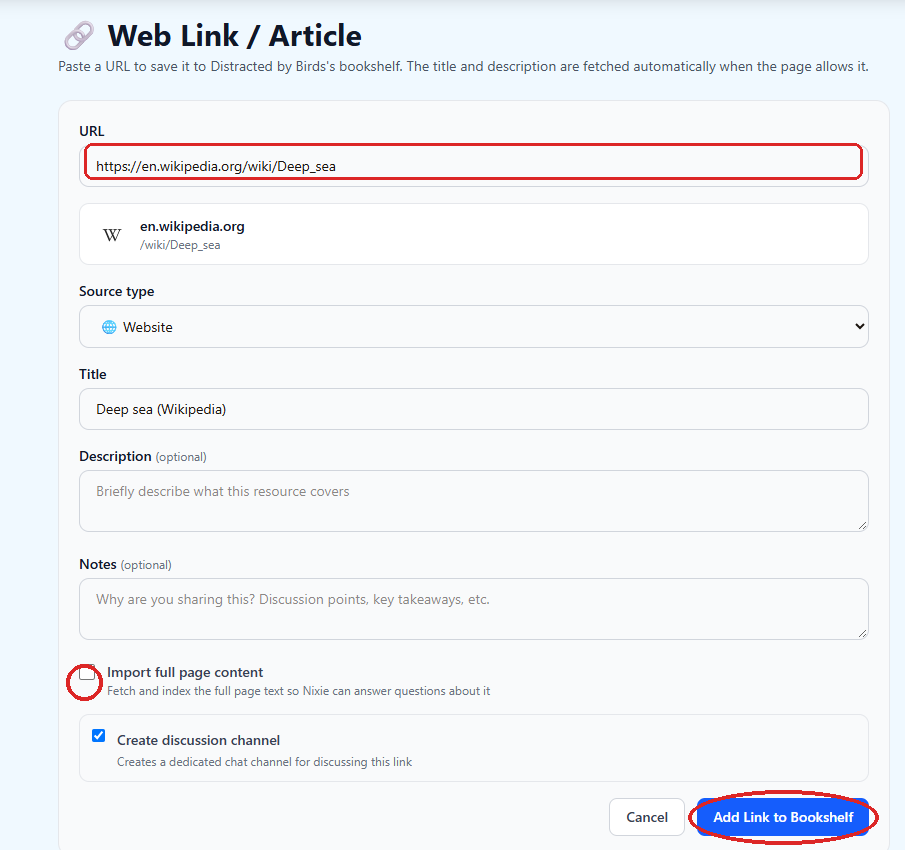
🔗 URL (required)
The address you are saving. Paste it in and the page starts working.
🏷️ Title (required)
Auto-filled when possible; the Add button stays disabled until it has a value.
📝 Description & notes (optional)
Both are indexed. The description summarises the page; the notes say why it belongs.
📄 Import full page content (optional)
Fetches the page's text so the room's assistant can answer from it.
➕
Step by step
1
Open the room's Add to Bookshelf page
Bookshelf → Add Knowledge to Bookshelf.
2
Open Web Link / Article
In From the web, click 🔗 Web Link / Article. It opens the dedicated page.
3
Paste the URL
The page shows the site icon and hostname as you type. Metadata (title, description, cover image, source type) is fetched automatically when the page allows it.
4
Adjust the title
Title is required. Keep the auto-filled one if it is accurate, or replace it with something that tells the room what the link is.
5
Add a description and notes
The description summarises the page; the notes say why you are sharing it and what to look for. Both are indexed.
6
Decide on full-page import
Tick Import full page contentif the room should be able to ask questions about the page's body, not just its title.
7
Choose the discussion channel
Create discussion channel is on by default. Leave it on for a link you expect to discuss; turn it off for a quiet reference.
8
Add the link
Click Add Link to Bookshelf — or Submit for Approval when the room requires it. The page confirms with a toast and returns you to the bookshelf.
💡Cancel goes back to the add page. The Cancel button and the ← Back to Add to Bookshelf link both return you there without saving.
✨
How auto-fill behaves
When you paste a URL, the page fetches the page's metadata — normally the title, a short description, a social-preview image, and a guessed source type. It fills only the fields you have left empty, so your own words are never overwritten.
⏱️ Debounced
Typing a URL schedules the lookup; the page waits briefly before asking, and asks again when the field loses focus.
🖼️ Cover preview
A fetched preview image is shown with a ✕ Clear button if you do not want it.
🏷️ Source type
A detected type can set the source dropdown; you can always change it.
✍️ Manual fallback
If metadata cannot be fetched, the page says so and waits for you to fill the title and description by hand.
⚠️Auto-fill is best-effort. Paywalled, private, JavaScript-only, or bot-blocked pages may return little or nothing. The title field is still required, so be ready to type it.
🗄️
What gets saved
The link becomes a bookshelf entry on this room's shelf. It keeps the URL, title, description, notes, source type, cover image, who added it, and when.
📎 Files & Links
A normal web link appears under 📎 Files & Links on the bookshelf hub.
▶️ Videos
A YouTube URL is detected, previewed in the form, and filed under ▶️ Videos.
🧠 Metadata is indexed
A link added as approved embeds its title, description, and notes for the room's assistant.
📄 Full text, when requested
For a link added as approved, a successful full-page import also indexes the article text.
ℹ️The web page is not stored as a copy you can browse offline. The shelf keeps the link and whatever text the import managed to extract. If the page disappears, the entry and its extracted text remain.
🛡️
Approval
If the room requires approval and your role is not owner or moderator, the link is created as pending. The page shows an Approval Required notice and the button reads Submit for Approval.
Pending links are not shown to members while they wait; a moderator reviews them on the bookshelf home.
🔁
After adding
1
Find it under Files & Links
Bookshelf → 📎 Files & Links lists the link with its title. Open it to read the details and discuss.
2
Use the discussion
The entry has its own thread; the channel you left checked gives it a dedicated place in chat.
3
Ask the room's assistant
With metadata — and full-page text when imported — the room's AI can answer from the link and point back to it.
4
Adjust the entry
Owners and moderators can update the card's title, description, and notes from the shelf. The underlying URL stays the same.
🔑
Who can do what
| Action | Member | Contributor | Moderator / Owner |
|---|---|---|---|
| Open the Web Link page | ⚙️ | ⚙️ | ✅ |
| Add a link to the shelf | ⚙️ | ⚙️ | ✅ |
| Import full page content | ⚙️ | ⚙️ | ✅ |
| Choose the discussion channel | ⚙️ | ⚙️ | ✅ |
| Approve a pending link | — | — | ✅ |
| Edit the shelf metadata | — | — | ✅ |
| Remove the shelf entry | — | — | ✅ |
✅ always · — never · ⚙️ depends on the room's bookshelf permission setting. An owner-only shelf keeps this page closed to everyone else.
💡
Best practices
💡Import the text you will question.If the room will ask about the article's argument, tick full-page import. If it only needs the link, leave it off and keep the shelf light.
💡Spend a sentence on the title and description. These are the retrieval signals; a bare URL cannot tell the room why it matters.
💡Use notes for the prompt.“Read section 3 before Thursday” gives the room a task; “interesting” gives it nothing.
💡Prefer a Document for your own synthesis.If you are writing the argument rather than pointing at someone else's, a Room Document is the better home.
⚠️Check paywalls before a session. Auto-fill and full-page import cannot read what the room cannot open.
❓
FAQ
▶Why is Add Link to Bookshelf disabled?
It needs both a URL and a title. If auto-fill did not supply the title, type one in.
▶Auto-fill could not find the title. What now?
Type the title and description manually. Some pages block metadata requests or are private; the link can still be saved.
▶What does Import full page content actually do?
It asks the platform to fetch the page's readable text and add it to the entry's indexed content, so the room's assistant can answer from the article body rather than only the title.
▶Does the room's AI read every link?
It reads the metadata — title, description, notes — and the full page text when the import succeeds. It does not browse the live page later.
▶I added a YouTube URL. Why is it under Videos?
The form detects YouTube links and files them as videos. For a whole playlist, use the dedicated Videos page, which supports playlist imports.
▶The page says my link is pending.
The room requires approval for your role. A moderator reviews pending items on the bookshelf home; until then the link is not shown to members.
▶Can I change the title after adding?
Owners and moderators can edit the shelf card's title, description, and notes. The URL itself stays fixed.
▶Can I add a private or paywalled article?
You can save the URL, but auto-fill and full-page import may return nothing useful. The room will see the title and description you provide.
🚀
Try it on a real bookshelf
Open the example room's Web Link page, or continue with the rest of the shelf.
🔗→📚→📚→📄→🎓→
Open the Web Link page
Add a link to Distracted by Birds and watch it land under Files & Links.
Bookshelf Knowledge
How links, works, documents, and videos become one searchable room knowledge base.
Adding From My Library
Shelve a catalog work you have already saved.
Adding Documents to a Bookshelf
Create an editable Room Document instead of saving a URL.
All tutorials
Browse the full tutorial library for more guides.
Save a link the room can use
Paste the URL, frame it in a title, and import the text if it matters.