NotaeLibrary
🔌 Adding a Custom MCP Feed
A Custom MCP Feed connects an external MCP server to the room. Pick a tool, and the platform calls it now and on a schedule, saving the result to the bookshelf as fresh room knowledge. This guide covers the dedicated page, tool discovery, API keys, credits, and refresh behaviour.
🔌 MCP🔁 Live data🪙 5 credits / refresh👑 Owner / Moderator
On this page
🔌
What a Custom MCP Feed is
MCP — the Model Context Protocol — is a standard way for a server to expose tools that an AI or an automation can call. A Custom MCP Feed lets the room call one tool from an external MCP server on a schedule and keep the returned text on the shelf.
The first call happens when you add the feed. After that, a scheduled refresh calls the same tool, replaces the saved content with the fresh result, and re-indexes it for the room's assistant.
🛰️ External source
The data lives on someone else's MCP server; the room stores the result.
🔁 Scheduled refresh
The tool is called again on your chosen interval, not just once.
🧠 Indexed content
The fetched text is embedded for the room's assistant on each successful refresh.
🪙 Credit-metered
Every call costs 5 credits from the room owner, including the first.
⚠️It pulls from someone else's server. The room owner is responsible for having the right to use that data source. NotaeLibrary does not claim ownership of content retrieved from external servers.
🧭
MCP feed, RSS, or web link?
| Source | Use it for |
|---|---|
| 🔌 Custom MCP Feed | A tool on an MCP server that returns data — inventory, stats, reports, live readings. |
| 📡 RSS / News Feed | A published feed of articles or videos from a blog, news site, or channel. |
| 🔗 Web Link / Article | One specific page you want on the shelf now. |
💡RSS is a feed of articles; MCP is a tool call. If the source already publishes an RSS feed, subscribe to that. Use an MCP feed when the data only exists behind a tool.
👑
Who can add one
Only the room owner and moderators can add a Custom MCP Feed. The card is hidden from contributors and members, and the page redirects them away.
👑 Owner
Can add and configure feeds. All refreshes are charged to the owner's credits.
🛡️ Moderator
Can add and configure feeds; the credits still come from the room owner.
✍️ Contributor / 👤 Member
Cannot add live feeds. They can read the shelf entry once it exists.
⚠️Credits are owner-funded. A feed that refreshes hourly costs 120 credits a day. Agree on the interval before adding one.
🧰
Before you start
🔒 An HTTPS MCP URL
The server endpoint, starting with https://. Plain HTTP and private-network addresses are rejected.
🧰 A tool name
The tool the feed should call — find it with Discover tools or type it manually.
🔑 An API key, if required
Optional. It is sent as a Bearer token, encrypted at rest, and shown once after saving.
🪙 Enough credits
At least 5 credits on the room owner's account for the first fetch.
ℹ️Know what the tool returns.The feed saves the tool's text response. A tool that returns a tight summary or report works better than one that dumps a huge JSON blob.
🧭
Where to find it
On the room's Add to Bookshelf page, the Live data feeds section holds the 🔌 Custom MCP Feed card. It is visible only to owners and moderators and opens the dedicated page.
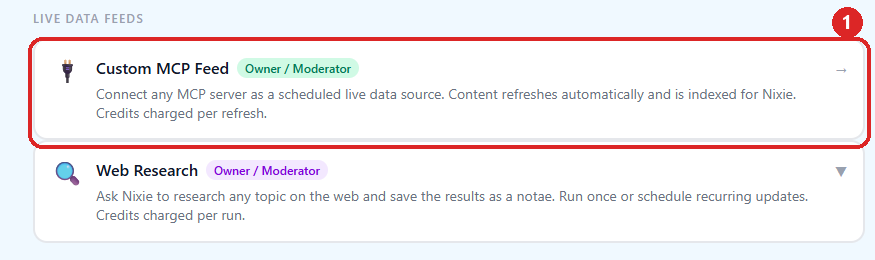
The page lives at /study-rooms/<room>/bookshelf/add/mcp. The Web Research card below it still expands in place.
🖼️
The Custom MCP Feed page
The page is one form. Feed name and server URL are required; a tool name is required; the rest is optional.
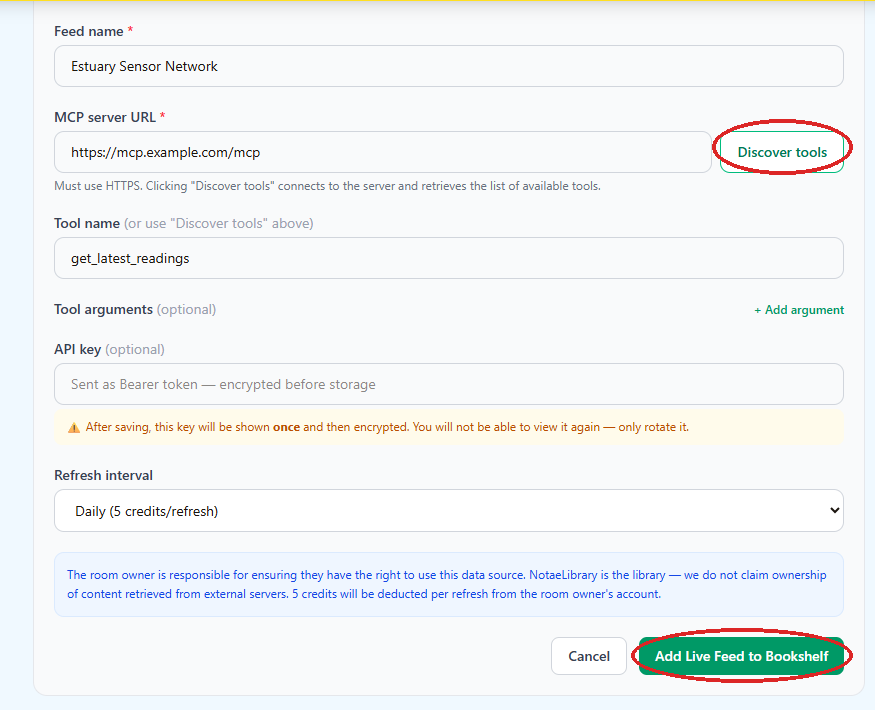
🏷️ Feed name
What the shelf entry is called. It also becomes the live feed's source label.
🌐 MCP server URL
The HTTPS endpoint of the MCP server. Discover tools calls its tools/list method.
🧰 Tool name
The tool to call on every refresh. Pick from discovery or type the exact name.
⏱️ Refresh interval
Hourly, 6-hourly, 12-hourly, daily, or weekly. Every option costs 5 credits per refresh.
➕
Step by step
1
Open the room's Add to Bookshelf page
Bookshelf → Add Knowledge to Bookshelf.
2
Open Custom MCP Feed
In Live data feeds, click 🔌 Custom MCP Feed.
3
Name the feed
Use something the room will recognise — “Estuary Sensor Network” beats “Feed 1”.
4
Enter the MCP server URL
It must be HTTPS. If the server needs a key to list its tools, enter the API key before discovering.
5
Discover tools, or type the name
Click Discover toolsto fetch the server's tool list and choose one. If discovery is unavailable, type the tool name manually.
6
Add arguments (optional)
Some tools need parameters — a region, an ID, a date. Add a key/value pair for each and the feed will send them on every call.
7
Choose the refresh interval
Hourly, 6, 12, daily, or weekly. This is the schedule the platform will re-call the tool on.
8
Add Live Feed to Bookshelf
Click the button. The platform calls the tool immediately to prove it works; a failure is shown and nothing is saved.
9
Save the API key if one was used
If you entered a key, a modal shows it once. Copy it, tick the confirmation, and close the modal. The feed is now on the shelf.
💡The initial call is part of adding. The first tool call is what proves the server, tool, arguments, and key work — and it is charged as the first refresh.
🔍
Discovering tools
Discover tools asks the MCP server for its tool list (tools/list) and turns the result into a dropdown of tool names and descriptions. It is a convenience, not a requirement — the manual tool-name field is always available.
✅ Discovery works
Choose a tool from the dropdown; the feed will call exactly that name.
⌨️ Discovery unavailable
Click Enter tool name manually insteadand type the tool's exact name.
🔒 HTTPS and safety
The URL is validated before any network call. Local, private, and plain-HTTP addresses are refused.
⚠️ Clear errors
Unreachable server, bad key, or no tools produce a specific message above the button.
🔑
API keys and security
If the MCP server needs authentication, paste its key in the API key field. It is sent as a Bearer token when the tool is called, and it is encrypted with AES-256-GCM before storage.
👁️ Shown once
After a successful add, the key is displayed one time. Copy it then; it cannot be viewed again.
🗄️ Encrypted at rest
The stored value is ciphertext; the server never logs or echoes it back in a response.
🔁 Used on every refresh
The cron decrypts it in memory for the tool call, then discards it.
⚠️ Lost key
If the key is lost, the feed cannot authenticate. Plan to store it somewhere safe before you close the modal.
⚠️Do not paste a key you cannot replace. Treat the one-time reveal as the only copy the platform will give you.
🔁
Refresh, credits, and approval
A scheduled job finds live feeds that are due, calls the configured tool, replaces the saved content, and re-indexes it. It also charges the room owner.
1
The initial fetch
When you add the feed, the tool is called immediately. Its text is saved and indexed. The owner is charged 5 credits.
2
The next refresh
The feed is scheduled for the chosen interval. At that time the tool is called again.
3
Fresh content replaces the old
The new result overwrites the saved text and is re-vectorized, so the room's assistant reads the latest version.
4
Credits are checked first
If the owner does not have 5 credits, the refresh is skipped and the feed is paused with an error explaining why.
5
Approval gates refreshes
If the room requires approval, a new feed starts as pending. Only approved feeds are refreshed by the schedule.
⚠️Hourly is expensive. 5 credits × 24 refreshes is 120 credits a day for one feed. Use the longest interval that still gives the room fresh-enough data.
🗄️
What gets saved
The feed becomes a bookshelf entry whose body is the tool's latest response. Everything else — server URL, tool name, arguments, interval, and the encrypted key — lives in its configuration.
📄 Latest response
The text the tool returned, refreshed on schedule.
🧠 Indexed for the room
Each successful refresh re-embeds the content for the room's assistant.
🏷️ Feed name
The label you gave it, used on the shelf and as the source label.
⏱️ Schedule
The interval, next refresh time, last refresh time, and any error.
ℹ️One entry, updated in place. Refreshes do not create a new card each time; they replace the content of the existing feed entry.
🔐
Who can do what
| Action | Member | Contributor | Moderator / Owner |
|---|---|---|---|
| Read a live-feed entry | ✅ | ✅ | ✅ |
| Open the Custom MCP Feed page | — | — | ✅ |
| Discover a server's tools | — | — | ✅ |
| Add a live feed | — | — | ✅ |
| Spend owner credits on refresh | — | — | ✅ |
✅ always · — never. Live feeds are steward-only because every refresh charges the room owner.
💡
Best practices
💡Test the tool before you trust the schedule. The initial call proves the URL, key, tool, and arguments. If it fails, fix it now — the scheduler will not.
💡Pick a tool with a compact text result. A short report or summary indexes well; a giant JSON dump wastes space and retrieval quality.
💡Use arguments to narrow the result. A region, a team, or a date range often turns an unusable firehose into a useful feed.
💡Choose the slowest interval that works. Daily or weekly is right for most sources; hourly is for genuinely live data.
⚠️Watch the owner's credit balance.When it runs out, the feed pauses. Check the entry's error before assuming the source stopped publishing.
❓
FAQ
▶Discover tools failed. What should I check?
Use an HTTPS URL that is publicly reachable, confirm the API key if the server needs one, and make sure the server implements MCP tools/list. Private and local addresses are refused.
▶The server returned no tools.
The connection worked but the server reported an empty tool list. You can still type a tool name manually if you know it.
▶Can I add a feed without discovering tools?
Yes. Leave discovery alone and type the exact tool name in the manual field. Discovery is only a convenience.
▶Why does adding fail with a credit error?
The room owner needs at least 5 credits for the initial fetch. Top up the owner's credits and try again.
▶The feed stopped refreshing.
Check its error on the shelf entry. A missing credit balance pauses the feed; a tool or key failure is recorded on the next attempt. Fix the cause before relying on the feed again.
▶I lost the API key after saving.
The key is shown once and encrypted after that; it cannot be retrieved. If it is lost, the feed cannot authenticate and needs to be set up again with a replacement key.
▶Can a contributor add a live feed?
No. Only the room owner and moderators can add or configure live feeds, because each refresh charges the owner.
▶Does each refresh create a new bookshelf card?
No. The same shelf entry is updated in place with the latest tool result.
🚀
Try it on a real room
Open the example room's Custom MCP Feed page, or go deeper on MCP.
🔌→🛰️→📚→📡→🎓→
Open the Custom MCP Feed page
See the dedicated form for Distracted by Birds.
MCP feature tutorial
Connect a room to an external AI client and understand MCP access.
Bookshelf Knowledge
How live feeds, links, documents, and videos become one room knowledge base.
Adding RSS & News Feeds
Subscribe to a published feed of articles or videos instead.
All tutorials
Browse the full tutorial library for more guides.
Give the room a live source
Prove the tool once, then let the schedule keep it fresh.